The worst outbound email you will ever send is not a badly written one. It is a well written cold pitch that lands in the inbox of a customer who renewed last month, or an open opportunity your AE has been nurturing for two quarters, or a prospect who replied “please remove me” in March and is now watching your brand do it again.
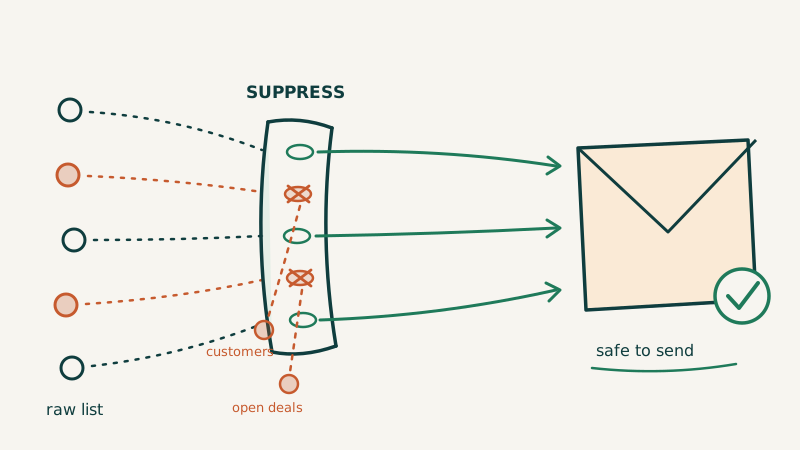
Those emails do not show up in your reply rate. They show up as an angry Slack message from a CSM, a stalled deal, a spam complaint, or a churned account. And almost every one of them traces back to the same gap: there is no real suppression layer between your data sources and your sequencer.
Suppression list management is one of the least glamorous parts of outbound operations and one of the highest leverage. This is how to build it properly.
What a Suppression List Actually Needs to Cover
Most teams define suppression as “people who unsubscribed.” That is one of at least eight categories you need to exclude. A complete do-not-contact layer covers:
1. Explicit opt-outs. Anyone who unsubscribed, replied asking to be removed, or submitted a privacy request. This is the legal minimum and it is non-negotiable.
2. Current customers. Nothing erodes trust faster than a prospecting email to someone already paying you. Suppress at the domain level, not just the contact level, because the person you cold email at an existing account may be three desks from your champion.
3. Open opportunities. If a deal is in your pipeline, the AE owns that account. An SDR sequence hitting a second contact at the same company mid-negotiation makes you look disorganized at the exact moment you need to look competent.
4. Recently worked accounts. Contacts touched in the last 90 to 180 days should cool off before re-entering a sequence. Without this rule, the same prospect gets your “quick question” four times a year from three different senders.
5. Active hiring and partner relationships. Vendors, resellers, agencies, and candidates all live in your CRM and none of them should receive a cold pitch.
6. Competitors. Cold emailing a competitor hands them your exact messaging, your offer, and your sequence timing. Suppress their domains.
7. Risky and invalid addresses. Hard bounces, role accounts (info@, sales@, careers@), spam traps, and known complainers. These damage domain reputation rather than relationships, but the suppression mechanism is the same.
8. Regional and regulatory exclusions. If you are not confident in your legal basis for a region, suppress it. The cost of excluding a geo is far lower than the cost of a complaint under GDPR or CASL.
The Architecture: One Layer, Checked Twice
The common failure mode is suppression living in whichever sending tool you happen to use. When you add a second sequencer, a dialer, or a LinkedIn tool, the list does not travel with you and the exclusions silently stop applying.
Build it as a single source of truth instead:
Data sources (enrichment, lists, inbound, events)
        |
        v
  SUPPRESSION LAYER  <-- one canonical list, all 8 categories
        |
        v
  Verification / validation
        |
        v
Sequencer, dialer, LinkedIn, calendar outreach
        |
        v
  Post-send suppression sync (replies, bounces, opt-outs)
Two checkpoints matter most. The first is before a contact ever enters a sequence. The second is a periodic re-scan of contacts already inside active sequences, because deals open, customers sign, and people unsubscribe while a cadence is still running. A contact that was safe on day one of a 21 day sequence is not guaranteed to be safe on day 14.
That second check is the one almost nobody builds, and it is where most “why did we email our customer” incidents come from.
Domain Level vs Contact Level Suppression
Getting this wrong causes both over-suppression and under-suppression.
| Suppression type | Use for | Risk if you get it wrong |
|---|---|---|
| Contact level | Individual opt-outs, bad addresses, specific personas | Colleagues at the same account still get emailed, which is usually fine and sometimes required |
| Domain level | Customers, open deals, competitors, partners | Too broad at large enterprises where one business unit is a customer and another is a legitimate prospect |
| Domain plus business unit | Enterprise accounts, holding companies, franchises | Requires clean account hierarchy data in your CRM |
The practical rule: use domain level suppression for relationship-based exclusions (customer, deal, competitor, partner) and contact level for individual and data-quality exclusions. For enterprises above roughly 5,000 employees, allow explicit domain plus business unit carve-outs so you do not lock yourself out of a 40,000 person organization because one team bought a single seat.
Where Data Hygiene and Suppression Overlap
Two of the eight categories (hard bounces and invalid or risky addresses) are really data quality problems that suppression inherits. If you are catching them only after they bounce, you are paying for the damage before you record the lesson.
The fix is to validate before the send, not diagnose after it. Running every list through a verification layer like Scrubby catches catch-all domains, role accounts, and addresses that will hard bounce, so they get suppressed proactively instead of after they have already cost you reputation. Validation and suppression should feed the same list: anything verification flags as undeliverable goes straight into the permanent exclusion set so no future list build reintroduces it.
This matters more than it used to. With Google and Microsoft both tightening complaint and bounce thresholds, a single campaign that reintroduces 400 dead addresses you suppressed last quarter can move your domain from inbox to spam folder for weeks. Suppression is a deliverability control, not just a courtesy control.
Making Suppression Survive Real Operations
A suppression list that requires someone to remember to update it will decay within a quarter. Three mechanisms keep it honest.
Automate the inbound signals. Every reply containing a removal request, every unsubscribe click, and every hard bounce should write to the suppression list automatically. Manual triage is where exclusions get missed. If your reply handling is human (and it should be), the humans need a one-click action that writes to the canonical list rather than a mental note.
Sync from the CRM on a schedule, not on request. Customer status, deal stage, and partner flags all live in the CRM and all change daily. A nightly sync that refreshes the customer and open-opportunity exclusions is the difference between a system and a snapshot.
Monitor the accounts you are excluding. Competitor and partner suppression lists go stale as companies rebrand, get acquired, or launch new products under different domains. Tracking those domains with a monitoring tool like CAM surfaces the changes so your competitor exclusions stay accurate, which also keeps your competitive intent signals clean.
One more nuance that catches teams by surprise: suppression and warm outbound pull in opposite directions. A former champion who changed jobs is one of your highest-intent prospects, but they may also sit on your opt-out list from a previous role. Tracking those relationships in a dedicated system like Champions lets you distinguish “this person asked never to be contacted” from “this person is at a new company and we have a real relationship to re-open,” rather than collapsing both into a single blanket exclusion.
Auditing Your Current Suppression Layer in 30 Minutes
Run this once this quarter. You will almost certainly find something.
- Pull a customer collision report. Export every contact in an active sequence, join against your customer domain list, and count the matches. A healthy number is zero.
- Do the same for open opportunities. Any match is an AE conversation you need to have today.
- Check for cross-tool drift. Export the suppression list from each sending tool you use. If the counts differ by more than a rounding error, you do not have one list, you have several.
- Test an opt-out end to end. Reply “unsubscribe” to one of your own sequences from a test address and confirm it appears in the canonical list, not just in that one tool.
- Re-verify the last 1,000 contacts you sent to. If more than 3 percent come back invalid, your pre-send validation is not running where you think it is.
- Spot check the mid-sequence re-scan. Pick five contacts who have been in a sequence longer than two weeks and confirm their customer and deal status is still current.
Any failure here is cheap to fix and expensive to ignore.
Who Should Own This
Suppression is a RevOps responsibility that often lands nowhere, because it sits between the data team, the SDR team, and legal. Someone needs to own the list, the sync jobs, and the quarterly audit explicitly. If nobody owns it, it will exist as a CSV in someone’s downloads folder.
This is also one of the clearest advantages of running outbound through a partner that already has the plumbing. When Vendisys runs outbound for a client, the suppression layer, the pre-send verification, the CRM sync, and the mid-sequence re-scan are part of the engine rather than a project someone has to staff and maintain. You hand over the exclusion rules, including customers, open deals, competitors, and regions, and the enforcement happens upstream of every channel instead of inside each tool separately.
Whichever way you run it, the standard is the same. One canonical list, eight categories, checked before the send and again during the sequence, synced automatically from the systems where the truth actually changes. Get that right and the only people hearing from you are the ones you meant to reach.