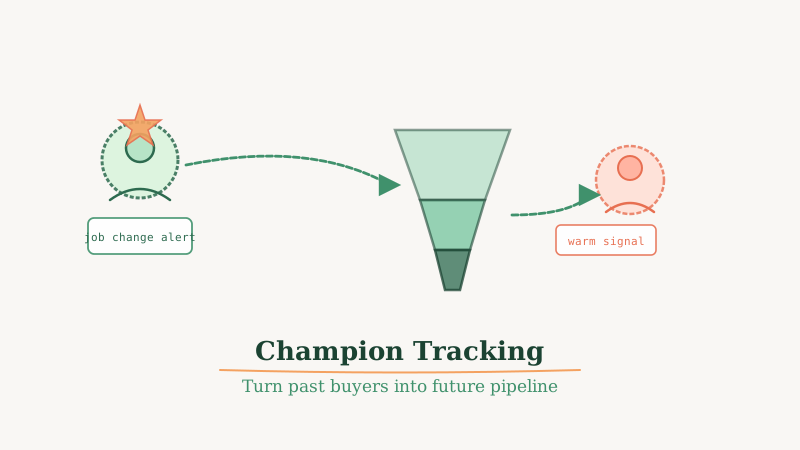
Your warmest outbound segment is not a new account you have never touched. It is someone who already bought from you, used your product, and can speak to the outcome it delivered. When that person moves to a new company, they carry that proof with them and you have a window to get in front of a brand new buying center before any competitor does.
This is champion tracking, and most B2B sales teams either ignore it entirely or catch these signals weeks too late. This guide walks through how to build a champion tracking workflow that runs continuously, surfaces job changes in near real-time, and feeds a repeatable warm outbound sequence.
Why Champions Convert at 3x the Rate of Cold Prospects
A champion is any past buyer, power user, or strong internal advocate who has firsthand experience with your product. When they land at a new company, several things are true simultaneously:
- They already believe in the outcome your product delivers
- They have no switching cost or competitor loyalty at the new company
- They are in the “new job, big plans” window where budgets are more flexible
- They can pull the deal internally without needing as much education
Conversion rates from champion outreach routinely run two to four times higher than cold outbound to net-new accounts. The catch is that you have to reach them fast. The optimal outreach window is within the first 60 to 90 days of a job change, before they are locked into new vendor relationships and before their calendar fills up.
What You Need to Track Champions at Scale
Champion tracking has three moving parts: a signal source, a contact database, and a workflow that connects them.
Signal source. You need a way to detect when someone changes companies. LinkedIn Sales Navigator job change alerts are the standard, but they are expensive and slow. Tools like GetChampions are purpose-built for this use case, monitoring contact records continuously and surfacing verified job change events with enriched firmographic data on the new company. This matters because you do not just want to know that someone moved; you want to know whether the new company fits your ICP before you spend time reaching out.
Contact database. Your CRM is the source of truth for who counts as a champion. Pull a list of: (1) closed-won contacts who used your product actively, (2) contacts who were economic buyers or champions in deals you ran (even if you lost), and (3) strong advocates who referred accounts or participated in case studies. These are your tier-one champions. Everyone else who touched a past deal is tier two.
Workflow. Once a job change fires, you need a clear process for who reviews it, what outreach gets sent, and how quickly it moves. We will cover this below.
Building the Champion Tracking Workflow
Step 1: Export and Segment Your Champion List
Pull all contacts from your CRM who fall into the tier-one or tier-two definitions above. At minimum, capture: full name, last known company, last known title, email, and the outcome they achieved with your product (or the role they played in a deal).
Segment them into cohorts based on strength of relationship:
- Tier 1: Direct buyers, power users, or references who can speak to ROI
- Tier 2: Champions in lost deals, influencers, or contacts with weak product exposure
Tier-one champions get a more personal, direct outreach when they move. Tier-two champions get a lighter touch sequence.
Step 2: Feed the List Into a Job Change Monitor
Upload your champion list to a monitoring tool and configure alerts for job changes. The key fields to watch for on the new company side are: company size (does it fit your ICP?), industry, and whether a buying team exists (headcount in the relevant department).
Tools like GetChampions handle this continuously and can push verified signals directly into your CRM or outbound tool via webhook, so you are not manually checking dashboards.
Step 3: Qualify the Signal Before You Reach Out
Not every job change is worth pursuing. Before you trigger outreach, answer three questions:
- Does the new company fit your ICP on firmographics (size, industry, funding stage)?
- Does the champion’s new title indicate budget authority or influence over the buying decision?
- Are there any disqualifiers (competitor employee, tiny startup, non-relevant vertical)?
If the answer to question one and two is yes, move to outreach immediately. If you are unsure, a quick LinkedIn lookup takes 60 seconds and saves you from burning a warm relationship on a bad-fit account.
Step 4: Send the Outreach Within 30 Days of the Job Change
Speed matters more than polish here. Your first message should be short, reference the shared history, and make a specific ask. It does not need to be elaborate. Here is a structure that works:
Subject: Congrats on the new role at [Company]
Body: Hey [First Name], saw you moved to [Company]. Congrats on the new chapter.
We worked together at [Previous Company] and I know you saw [specific outcome] firsthand. Would love to catch up and see if there is a fit at [New Company] given what you are building there.
15 minutes this week or next?
That is it. No long pitch, no feature list. The relationship is the credibility. If they were a tier-one champion, you can add one line referencing the specific result they achieved. If they were a tier-two champion (influencer in a lost deal), acknowledge the prior conversation and note that their new company looks like a better fit.
Use a clean, properly authenticated sending domain for these emails. If you are scaling champion outreach across multiple champions simultaneously, make sure your sending infrastructure is solid. Tools like Scrubby can verify that the champion’s new email address is valid before you send, which protects your domain reputation and avoids bounces on what should be your highest-value outbound segment.
Step 5: Route Replies Directly to an AE or Senior Rep
Champion replies should not go into a generic inbox or get worked by a junior SDR. These are warm, pre-qualified conversations. Route them to an account executive who can run a proper discovery call and move fast.
Set up a simple rule in your email tool: any reply from a champion sequence goes to the AE who owned the original deal, or to a senior rep if no original deal exists.
Measuring Champion Tracking ROI
Track these metrics to understand how the program is performing:
| Metric | What to Measure |
|---|---|
| Signal volume | Job changes detected per month |
| Qualification rate | Percentage that fit ICP at new company |
| Outreach rate | Percentage contacted within 30 days |
| Reply rate | Replies divided by outreach sent |
| Meeting rate | Meetings booked from champion outreach |
| Close rate | Deals won from champion-sourced pipeline |
Most teams that run champion tracking find that meeting rates are 20 to 40 percent, compared to 3 to 5 percent on cold outbound. The close rate is typically higher as well, because the champion can navigate the new buying committee faster than any external SDR.
Integrating Champion Tracking Into Your Broader GTM Motion
Champion tracking works best when it is not isolated. Feed the signals into the same pipeline reporting your team uses for cold outbound so leadership can see the full picture of where pipeline is coming from.
If you are running outsourced outbound at the same time, make sure your outbound partner knows which accounts have a champion signal active so they do not run cold sequences into the same buying center simultaneously. Coordinating warm and cold motions at the account level prevents awkward overlaps.
At Vendisys, we build champion tracking into the GTM infrastructure we run for clients from day one, because it is consistently the fastest path to early pipeline wins, especially in the first 60 days of an outbound program. The combination of a continuously refreshed champion list and a fast trigger-based sequence creates a compounding asset that gets more valuable the longer you run it.
Common Mistakes to Avoid
Waiting too long to reach out. The 30-day window is real. After 90 days, champions are settled, budgets are allocated, and the opportunity window closes fast.
Treating champions the same as cold prospects. A champion who drove a six-figure deal at a previous company does not need a generic cold email opener. Reference the shared history directly.
Not qualifying the new company. A champion at a 10-person startup with no budget is not a good use of your warm outreach capacity. Qualify the signal before you trigger the sequence.
Letting signals pile up unworked. Champion tracking only works if someone is actually reviewing and acting on the alerts. Build a clear ownership model: who reviews signals, who approves outreach, and who works the reply.
The Bottom Line
Champion tracking is the highest-ROI outbound motion most B2B sales teams are underinvesting in. Past buyers who move to new companies are warmer than any cold prospect you will find, and they have a built-in reason to take your call. The infrastructure to track them continuously and reach out fast is now accessible even for early-stage teams.
Start by exporting your past buyer and champion list from your CRM, setting up a job change monitor, and committing to a 30-day outreach SLA when a signal fires. That simple workflow, run consistently, will outperform most cold outbound programs on a cost-per-meeting basis.