There is a number in every cold email platform that quietly ruins outbound programs, and it is the delivery rate.
Your sequencer reports 99.2% delivered. Nobody bounced. The campaign looks healthy on every dashboard you have. Your reply rate is 0.4%, and you spend the next six weeks rewriting subject lines, because the dashboard told you the sending worked and the only remaining variable is the copy.
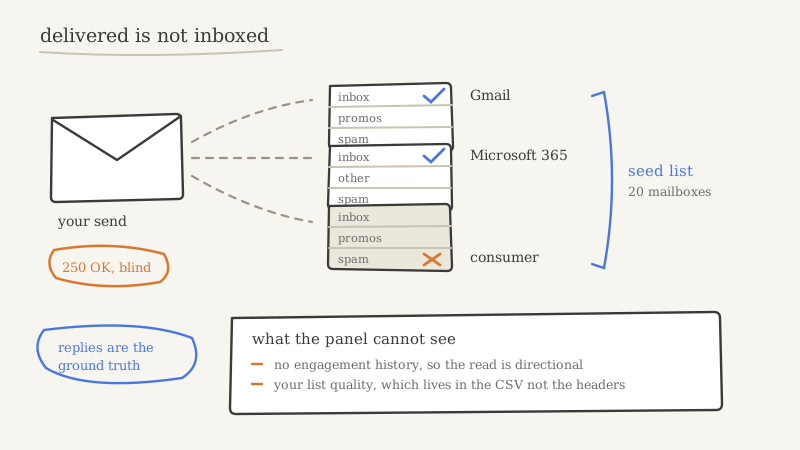
Delivered means the receiving mail server accepted the message. It says nothing about which folder the server put it in. A message filed in spam is delivered. A message filed in Gmail’s Promotions tab is delivered. A message silently dropped after acceptance is delivered. The gap between delivered and read is where most of a failing outbound program actually lives, and the only instrument that measures it from outside is an inbox placement test.
This post compares the three tools most B2B teams end up choosing between (GlockApps, MailReach and InboxAlly), explains what each one is genuinely built to answer, and is honest about the four questions none of them can answer. The goal is not a winner. It is that you run the right test, read it correctly, and act on it in the right order.
What a placement test actually measures
Every one of these tools works on roughly the same mechanic: a seed list.
A seed list is a controlled set of real mailboxes spread across mailbox providers (Gmail, Microsoft 365, Outlook.com, Yahoo, and whichever regional providers the vendor covers). You send your campaign to those addresses alongside your real audience, or as a standalone send. The tool then inspects each seed mailbox and reports, provider by provider, which folder the message landed in: inbox, a tab such as Promotions or Other, spam, or missing entirely.
That folder-level read is the thing your sending platform cannot give you, because your platform’s visibility stops at the SMTP response. Once the receiving server says 250 OK, your sequencer’s job is done and its reporting goes dark.
Most tools bundle three other diagnostics alongside the placement read, and they matter more than the headline percentage:
- Authentication checks. Whether SPF, DKIM and DMARC actually validated at each receiver, which is different from whether your DNS records exist. If this fails, nothing downstream is worth analysing. Fix it first using an SPF, DKIM and DMARC setup checklist and re-test.
- Blocklist status. Whether your sending IP or domain appears on public blocklists at the moment of the test.
- Content and spam-filter scoring. How filters such as SpamAssassin score the message, plus flags on link counts, image-to-text ratio, and tracking domains.
A placement test is a diagnostic panel, not a score. Teams that treat the inbox percentage as a KPI to optimise usually end up gaming the seed list. Teams that treat the panel as a triage tool find the actual fault.
GlockApps: breadth, when you do not know where the problem is
GlockApps is the widest net of the three. It runs multi-ISP seed testing across 30-plus providers, pairs that with DMARC analytics, monitors a large set of blocklists (50-plus), and includes content analysis in the same report. At the time of writing its Essential tier sits around $59/month with a fixed credit allowance and Pro around $79/month, though every vendor in this category reprices often enough that you should check before budgeting.
What the breadth buys you is differential diagnosis. If your messages inbox cleanly at nine providers and land in spam at one, the problem is almost certainly that provider’s filtering logic interacting with something specific (your content, your sending volume per mailbox, your domain age). If you are in spam nearly everywhere, the problem is upstream: authentication, blocklist, domain reputation, or list quality. You cannot make that distinction from a two-provider test, and that distinction determines everything you do next.
The flip side of the breadth is relevance. A meaningful share of that provider coverage is consumer mail. If you sell to B2B buyers, your real audience is overwhelmingly on Google Workspace and Microsoft 365, and the consumer rows in a GlockApps report are noise you have to learn to ignore. The report is not wrong. It is answering a broader question than the one you asked.
Reach for GlockApps when: you have an unexplained deliverability problem and no hypothesis, you need DMARC aggregate reporting and blocklist monitoring in one place, or you are documenting a deliverability issue for someone else (a vendor, a client, a board) and want evidence that is hard to argue with.
MailReach: the B2B-weighted read
MailReach weights its seed list toward Google Workspace and Microsoft 365 mailboxes rather than consumer inboxes, and it runs organic warm-up behind the scenes so the seed mailboxes have engagement behaviour rather than sitting inert. Entry pricing is low (single-digit dollars per month for the smallest tier at the time of writing), which makes it cheap enough to run continuously rather than as an occasional audit.
For a B2B outbound team, that weighting is not a minor preference. It is the difference between a measurement of your audience and a measurement of somebody else’s. Google Workspace and Microsoft 365 filter differently from their consumer counterparts, and Microsoft in particular is strict in ways that catch teams out repeatedly, which is why it deserves its own deliverability treatment. If 85% of your prospect list is on those two platforms, a seed list weighted toward them is the only placement read that maps to your pipeline.
The warm-up integration is a genuine advantage and also the thing to be careful about. Seed mailboxes with simulated engagement produce a more realistic placement read than dead mailboxes. They also mean the tool is participating in your reputation while measuring it, so you cannot cleanly separate the measurement from the intervention. Decide which of those two jobs you are paying it for.
Reach for MailReach when: you run B2B cold outbound, you want a continuous placement signal rather than a quarterly audit, and your priority is an accurate read on the two providers your buyers actually use.
InboxAlly: built for climbing out, not for looking in
InboxAlly belongs in this comparison but is not really the same product. Its centre of gravity is reputation recovery through engagement: a network of mailboxes that open, read, and positively interact with your mail to send engagement signals to the mailbox providers, with placement visibility as a supporting feature rather than the headline.
That makes it a different purchase. GlockApps and MailReach tell you where you stand. InboxAlly is bought to change where you stand, specifically when a domain is already filtering to spam and you need to rebuild its standing. If you have no placement problem, there is little for it to do.
Two cautions, stated plainly. First, engagement-signal services treat the symptom. If you are in spam because you are mailing a stale, unverified list, manufactured opens will move the needle for a while and the underlying cause will keep pulling it back. Second, if you are considering it for a domain that is badly burned, work the arithmetic on recovery versus retiring that domain and warming new ones on a clean domain warmup timeline. Recovery is often the more expensive path.
Reach for InboxAlly when: you have already diagnosed the root cause, fixed it, and need to rebuild engagement signal on a domain worth saving.
The comparison, condensed
| GlockApps | MailReach | InboxAlly | |
|---|---|---|---|
| Primary job | Broad diagnosis | B2B placement accuracy | Reputation recovery |
| Seed list weighting | 30-plus providers, consumer-heavy | Google Workspace and Microsoft 365 weighted | Engagement network |
| Authentication diagnostics | Deep (DMARC analytics included) | Present | Limited |
| Blocklist monitoring | Yes, broad | Basic | No |
| Content and spam scoring | Yes | Yes | Limited |
| Warm-up or engagement | No | Organic warm-up included | Core function |
| Best suited to | No hypothesis yet | Continuous B2B monitoring | Post-fix recovery |
| Wrong choice when | You only care about Google and Microsoft | You need blocklist and DMARC depth | You have not found the root cause |
The sequence most teams should actually follow: diagnose with breadth once, monitor with B2B weighting continuously, and reach for an engagement service only after the root cause is closed.
The four things no placement test can tell you
This is the section that saves money, because every one of these gets mistaken for a tool failure.
1. It cannot tell you what your real recipients see. Seed mailboxes have no history with your domain. Your actual prospect may have replied to you two years ago, or may sit behind a corporate gateway with rules your seed list will never encounter. Placement tests are directional. A test that reads 90% inbox does not promise 90% of your list saw the inbox.
2. It cannot tell you why. A test tells you that Microsoft filtered you. The cause (content, cadence, per-mailbox volume, domain age, recipient complaints, a shared IP neighbour) is inference work you do afterward. Every tool in this category sells diagnosis and delivers detection.
3. It cannot see your list quality. This is the big one. A placement test measures the message and the sender, not the recipients. The fastest way into spam at scale is mailing addresses that should never have been mailed: invalid addresses, spam traps, and the catch-all domains that most verification tools decline to resolve and simply pass through as risky. No amount of placement testing surfaces that, because the problem is in your CSV and not in your headers. Clearing it is a list-hygiene job, which is exactly what Scrubby exists to do: it is the validator that safely clears catch-all email, the segment other validators leave you guessing about. Run the list before you test the send, or you will spend a month optimising copy to fix a data problem.
4. It cannot measure the only metric that matters. Inbox placement is an input. Replies are the output. With open-rate tracking now largely broken as a signal, your reply rate by domain and by provider is the ground truth, and placement testing is how you explain a reply rate rather than a substitute for watching one.
A test protocol that produces a decision
Most placement tests get run badly, in a way that guarantees an uninterpretable result. The protocol below is deliberately boring.
Isolate one variable. Test one sending domain, one mailbox, one message template per run. If you send the same test from four domains at once, a mixed result tells you nothing about which domain is the problem.
Use the message you actually send. Not a cleaned-up version. Same tracking domain, same link count, same signature, same unsubscribe mechanism. The tracking domain in particular is a frequent culprit, and stripping it for the test hides the finding you were looking for.
Send from the real infrastructure. Placement is a property of the sending domain, the mailbox, the IP and the authentication records together. A test sent from a different mailbox on the same domain can read differently. This is why infrastructure you control beats infrastructure you rent: sending domains, mailboxes and warmup that are owned and configured as one system, which is what Inboxy handles inside a Vendisys program, give you a stable thing to measure. Shared sending pools give you a moving target, and a placement test against a moving target is a snapshot of someone else’s reputation.
Test at your real cadence. A single message to 20 seeds at 9am tells you about a single message at 9am. Placement failures are usually volume-triggered and show up at day nine of a ramp, not day one. Run placement checks across a ramp, not before one.
Record a baseline before you need it. Run a test on a healthy domain and keep the report. Deliverability problems are diagnosed by change, and without a known-good reading you cannot tell a new problem from a condition that existed all along.
What to do with a bad result, in order
When a test comes back with spam placement, work the list from cheapest and most likely to most expensive. The order matters, because teams routinely start at step five.
- Authentication. Confirm SPF, DKIM and DMARC validated at the receiver, not merely that the records exist. Misaligned DKIM is the single most common finding and the fastest fix.
- Blocklists. Check domain and IP. If you are listed, stop sending from that domain, resolve the listing, and set up continuous domain reputation and blacklist alerting so the next listing reaches you in hours instead of at the next quarterly audit.
- List quality. Pull the bounce and complaint data for the last 30 days by source. A single bad data purchase will outweigh everything else on this list, and the remedy is upstream verification, not sending changes.
- Content and links. Tracking domain reputation, link count, image weight, and the obvious spam trigger language. Test with the tracking domain removed as a controlled experiment, then put it back.
- Volume and cadence. Per-mailbox daily volume, ramp speed, and send-time clustering. If placement degrades as volume climbs, you are over-sending per mailbox and need more mailboxes rather than better copy.
- Provider-specific tuning. Only once the first five are clean. Use Google Postmaster Tools for the Gmail side and treat Microsoft as its own problem with its own remedies.
Steps one through three resolve the clear majority of placement failures. Steps four through six are where teams prefer to start, because rewriting copy feels like progress and auditing a DNS record does not.
Where placement testing sits in a working stack
A placement tool is one instrument on a panel, and on its own it will mislead you. The working set is four layers:
Placement testing gives you folder-level visibility, which nothing else does. Postmaster and provider dashboards give you real-recipient reputation data straight from the source, and no seed list can match that for authority. Blocklist and reputation monitoring gives you the alert that something changed. Reply rate segmented by provider and by domain gives you ground truth, because it is measured on your actual audience.
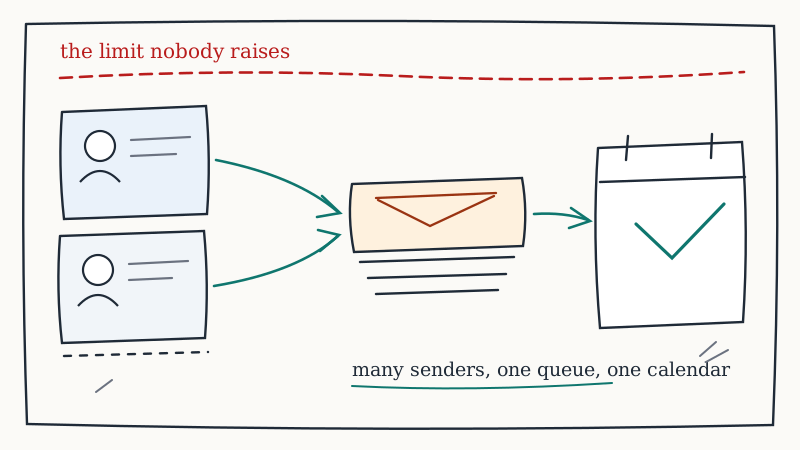
That last layer is where most teams have the real gap, and it is an operational one rather than a tooling one. Reply-rate-by-domain only exists as a metric if replies land somewhere you can count, segment and attribute. When email replies sit in one platform, LinkedIn responses sit in another, and neither is reliably written back to the CRM, you have no denominator and no way to tell a deliverability problem from a targeting problem. Consolidating responses into a single surface wired into the CRM (the job Underfive does for email and LinkedIn) is what makes the placement data actionable, because it gives you the outcome to correlate the placement read against. The broader version of that argument is in our guide to inbox placement and deliverability.
So which one
If you have a problem and no hypothesis, buy breadth: run GlockApps once, read the differential across providers, and let it tell you whether you have a global problem or a provider-specific one.
If you run B2B outbound at steady volume and want a signal you can watch rather than an audit you commission, run MailReach continuously, because its seed weighting matches where your buyers actually read mail.
If you have already found and fixed the root cause and are rebuilding a domain’s standing, InboxAlly is the right category of tool, and you should still price recovery against retiring the domain.
And if the honest answer is that you are buying a placement tool because nobody on the team owns deliverability, the tool will not fix that. Placement testing is an instrument, and an instrument needs an operator who reads it weekly, knows the baseline, and has the authority to change the sending configuration when it moves. Most outbound programs that fail on deliverability do not fail for lack of data. They fail because the data arrived in an inbox nobody was accountable for.
That ownership gap is the actual problem worth solving, and it is why some teams stop assembling instruments and hand the whole layer (domains, mailboxes, warmup, verification, monitoring and the operator who watches all of it) to a partner who runs it as infrastructure. If you would rather own the pipeline number than the panel of dashboards behind it, Vendisys operates that layer end to end, and the model is laid out in what outsourced GTM infrastructure actually means.