Every outbound team eventually hits the same wall: their favorite data provider only has good coverage on part of the market. You pull a list of 5,000 target contacts, and 40% come back with a missing email, a stale title, or a phone number that rings a former employer. You send anyway, and your bounce rate spikes, your domain reputation drops, and the reps blame the list.
The fix is not finding one perfect provider. That provider does not exist. The fix is a data enrichment waterfall: a sequence of providers where each one only fills the records the previous provider could not. Done right, a waterfall turns three mediocre 60% sources into one 89% coverage engine, and it does it at a lower blended cost per usable record than any single premium vendor.
This is the how-to. We will cover why single-source enrichment fails, how to order your providers, how to score coverage per tier, and the validation gate that has to sit at the end so all that extra coverage does not just become extra bounces.
Why single-source enrichment quietly caps your pipeline
Data providers build coverage where their supply is. A provider that scrapes professional networks is strong on tech and mid-market but thin on manufacturing, logistics, and anything regional. A provider built on business filings is strong on firmographics but weak on personal work emails. A provider fed by community-contributed contacts is strong on titles that use those tools and blind everywhere else.
So when you standardize on one vendor, you are not buying “the data.” You are buying that vendor’s specific bias. Your outbound coverage silently inherits it. The accounts you can never seem to reach are usually not bad-fit accounts. They are accounts your one provider happens to be blind to.
You feel this as:
- Reps skipping large chunks of the target list because “there’s no email”
- Bounce rates that stay stubbornly above 5% no matter how you warm the domain
- Whole industries in your ICP that produce almost no meetings, not because the message is wrong but because you never actually reached anyone
A waterfall attacks the root cause. Instead of accepting one vendor’s blind spots, you layer vendors whose blind spots do not overlap.
The core mechanic: fill only what’s missing
A waterfall processes each record through providers in order. The rule is simple: a provider is only asked to enrich the fields that are still empty after the providers above it.
Here is the logic in plain terms:
- Start with your raw list: names, companies, maybe LinkedIn URLs.
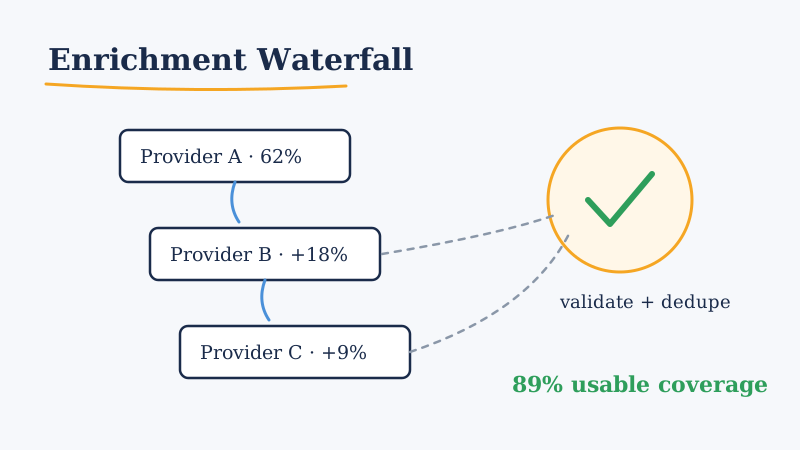
- Run Provider A (your highest-coverage, best-value source). It fills, say, 62% of the emails.
- Take only the 38% that are still missing an email and run Provider B. It fills another 18 points.
- Take the remaining 20% and run Provider C. It adds 9 more.
- You now sit at roughly 89% coverage, and you only paid Provider B and Provider C for the harder records that Provider A could not solve.
That last part is the economics of the whole approach. Premium providers are expensive per lookup, but in a waterfall you only spend those expensive lookups on the small tail of hard records. Your cheap, high-volume provider does the bulk of the work.
The same pattern applies to any field, not just email: direct-dial phone numbers, current job title, company headcount, tech stack. You can even run different waterfall orders for different fields, because the best email provider is rarely the best phone provider.
Ordering your providers: it’s not just about coverage
Most teams order providers by raw coverage percentage. That is a decent first guess, but three other factors matter just as much.
Blended cost per usable record. A provider with 70% coverage at a low unit price should usually go first, even if a 78% provider exists, because you want your cheapest source doing the heavy lifting. Save the pricey specialists for the tail.
Field freshness. A provider that returns an email attached to a job someone left 18 months ago is worse than no email, because it looks like coverage but produces a bounce. Weight providers that timestamp their records or refresh frequently. Stale data is the silent killer of waterfall quality. If you want a deeper checklist for judging a source before you trust it, we wrote one on how to vet a B2B lead data provider.
Non-overlapping strengths. The whole point of a waterfall collapses if provider two is strong in exactly the same segments as provider one. Before you add a source, pull a sample of the records provider one missed and test the candidate on those specifically. A provider that fills 50% of your leftovers is more valuable than one with higher headline coverage that only fills 15% of them.
A useful way to run this test: take 500 records that your primary source left empty, run each candidate provider on just those, and rank candidates by fill rate on the leftovers rather than by their marketing-page coverage number.
Scoring coverage per tier so you know when to stop
A waterfall can have two providers or seven. The question is when adding another one stops being worth it. Track three numbers at every tier:
- Marginal fill rate: what percentage of the still-empty records this tier filled. When this drops below roughly 5 to 8%, another tier is usually not worth the integration and cost overhead.
- Marginal cost per filled record: total tier spend divided by records it actually filled. This climbs at every tier. When it exceeds what a meeting is worth to you divided by your conversion math, stop.
- Post-validation survival rate: how many of the newly filled records actually pass validation (more on that next). A tier that fills 12% but only 4% survives validation is not really adding 12% of coverage.
Put these in a simple table after every list run. Over a few weeks you will see exactly where your waterfall should end, and you will catch the day a provider’s coverage silently degrades, which happens more often than vendors admit.
The validation gate: the step that makes coverage real
Here is the mistake that undoes everything above: teams treat “we found an email” as “we can send to this email.” Those are not the same thing. A waterfall, by design, reaches deeper into lower-quality data with each tier, so the records added by your later providers are exactly the ones most likely to be risky, stale, or catch-all addresses that silently swallow mail.
So every waterfall needs a validation gate at the end, before a single record enters your sequencing tool. The gate should:
- Verify the mailbox actually exists rather than just checking that the syntax and domain are valid. Catch-all domains are the trap here; they accept everything at the SMTP layer and then quietly discard mail, so a naive checker marks them “valid” while your real deliverability craters.
- Flag role-based and risky addresses (info@, sales@, abuse@) that hurt reputation.
- Deduplicate across providers, because two sources will hand you the same person with slightly different formatting.
This is where a dedicated verification layer earns its place. Running your enriched list through a validator like Scrubby before you send is what separates “89% coverage” from “89% coverage that actually lands in inboxes.” Scrubby is built specifically to unmask catch-all domains that ordinary validators wave through, which is exactly the failure mode a deep waterfall creates. If you want the full picture on why unverified enrichment tanks your sender reputation, our guide on keeping outbound out of spam at scale walks through the mechanics.
Think of it this way: enrichment maximizes reach, validation protects reputation. A waterfall without a validation gate is just a faster way to burn your sending domains.
A reference architecture you can copy
Putting it together, a production-grade waterfall looks like this:
- Normalize the input. Standardize company names and domains so every provider gets clean keys to match on. Bad matching upstream wastes lookups downstream.
- Tier 1 enrichment: highest coverage, lowest cost source. Fill emails, titles, firmographics.
- Tier 2 and Tier 3: specialist sources, each run only on the fields still empty after the tier above.
- Merge and dedupe: collapse duplicate records, and when two providers disagree on a field, keep the one with the fresher timestamp.
- Validation gate: verify mailboxes, drop catch-alls and risky addresses, and tag confidence levels.
- Route by confidence: send high-confidence records straight to sequencing, hold low-confidence ones for a phone or LinkedIn touch instead of email.
That last step matters. A waterfall does not just improve email coverage; it tells you which channel each contact is safe for. A record you enriched but could not fully validate is a perfect candidate for a call or a social touch rather than a risky send.
Build it, or plug into one that already exists
The honest tradeoff: a waterfall is more moving parts than a single vendor login. You are managing multiple contracts, multiple APIs, rate limits, matching logic, and a validation layer. For a team with a real revops function, that is a few weeks of work and then ongoing maintenance as providers drift.
The alternative is to run outbound on top of infrastructure where the waterfall and the validation gate are already built and tuned. That is a large part of what an outsourced GTM engine like Vendisys provides: multi-source enrichment, verification, and channel routing as a managed layer, so your reps get a clean, validated, deduplicated list instead of a raw provider dump. You get the coverage economics of a waterfall without standing up and babysitting one yourself.
Either way, the principle is the same. Stop treating list quality as something you buy from one vendor and start treating it as a pipeline: layer coverage, measure the margin at each tier, and put a hard validation gate at the end. That is how you reach the accounts your competitors’ single-source data can never see, without lighting your deliverability on fire to do it.